
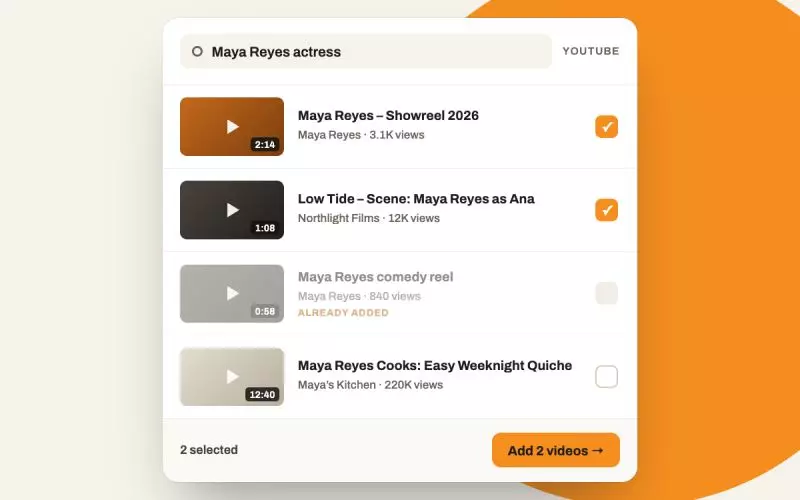
The Videos page only ever accepted a pasted address. So filling it meant leaving the admin, finding each video on YouTube, copying its address, coming back, pasting, saving, and doing that again for every clip. Now there is a search link under the Add Video button that does it in one pass.
How it works
The link is prefilled with your own name and professional title, because that is what you would have typed. Click it and a panel opens with the YouTube results for that search: thumbnail, length, channel and view count for each one. Tick everything that is yours and they are all added.
Length and channel are there for a reason. They are most of what separates your showreel from a clip somebody else uploaded with your name in the title, which is the actual difficulty with searching for yourself.
What it does not do
It does not guess. Nothing is added until you tick it, and the search is a plain text search on your name rather than anything claiming to recognize your face. If your name is common you will see other people, and you are the one who can tell the difference.
Anything already on your account is flagged and cannot be picked, so you cannot accidentally add the same reel twice.
Under the surface, each video you tick is handed to exactly the same code that has always handled a pasted address, so the title, the description and the thumbnail all come from the one path that already worked. This is a shortcut to the existing feature, not a second version of it. Adds happen one at a time rather than all at once, so a long list takes a few seconds.
Then edit the result
Search gets the videos onto the page. It does not decide what belongs there, and the temptation with a bulk add is to keep everything you find.
Resist it. One reel and three to five clips is the right shape, as argued in the video gallery rebuild. Anything weaker than your reel competes with your reel. Then set the one that matters as the feature, which is covered in putting your reel front and center, and give each clip a real title, because a clip title is text a search engine can read.
Related
The showreel guide and creating a standout acting reel are the right reads before you decide what stays. For the wider case, see video content for actors.
No video page yet? Create a free actor website and search for yourself.
Finished reading? Build yours next.
It takes about 76 seconds and it starts free, with your credits, headshots and reels already in it.
Build mine free→